Can I Pretend to Be a Browser, Please?
Why changing the User-Agent stopped being enough, how TLS fingerprinting works, and where browser impersonation helps a scraper.
Whenever I need to scrape a server-rendered page, I start with the laziest thing that might work: fetch() the URL and parse the HTML. Quite often, that is the whole scraper.
const response = await fetch(url);
const html = await response.text();
No browser, no page lifecycle, no waiting for selectors. It is cheap, fast, and much easier to run at scale than Chromium. But sometimes the same URL that opens normally in Chrome returns 403, a challenge page, or a suspiciously empty response when requested from Node.js.
My first instinct used to be changing the User-Agent. That trick has not aged well. A request can claim to be Chrome in its headers while introducing itself as Node.js during the TLS handshake. A modern WAF can see the contradiction before it reads the first line of HTTP.
This is where browser impersonation clients such as curl-cffi for Python, and impers or impit for Node.js, become useful. They make ordinary HTTP requests, but shape the connection to resemble one made by a real browser.
How scraping defenses got here
Early anti-scraping checks were wonderfully literal. Block an empty User-Agent, look for curl, count requests per IP, and show a CAPTCHA if the count gets silly. Scrapers adapted by copying browser headers, adding delays, and rotating proxies.
Defenders then had to look for inconsistencies instead of single bad values. Does a client claiming to be Chrome send the headers Chrome normally sends? Are they in a plausible order? Does it negotiate HTTP/2? Does it keep cookies? Is its traffic pattern remotely human?
TLS added another useful signal. HTTPS encrypts the request and response, but encryption has to be negotiated first. During that negotiation the client sends a ClientHello containing supported TLS versions, cipher suites, extensions, signature algorithms, elliptic curves, and ALPN preferences. Implementations make different choices here. Chrome, Firefox, Python’s OpenSSL bindings, and Node.js do not greet a server in quite the same way.
That greeting can be reduced to a fingerprint. JA3, published in 2017, hashes selected fields from the ClientHello. It became a common way to group clients, but modern Chrome randomizes TLS extension order, which makes the old order-sensitive hash change between connections. JA4 handles this better by sorting parts of the input and including information such as ALPN. The result is more stable for current browsers.
TLS is only one part of the conversation. HTTP/2 exposes its own implementation choices: the initial SETTINGS values, flow-control window updates, priority behavior, and pseudo-header order. The commonly used Akamai fingerprint captures several of them. A client with Chrome-like TLS and a non-Chrome HTTP/2 fingerprint is still an odd client.
This explains why replacing the User-Agent is cosmetic. The header says who the client wants to be. The protocol behavior says what software is making the request.
What impersonation changes
A browser impersonation library replaces or patches the usual networking stack and applies a recorded browser profile. Depending on the library and profile, that can cover:
- the TLS
ClientHello, including cipher suites and extensions; - ALPN and the selected HTTP version;
- HTTP/2 settings and pseudo-header order;
- browser headers, their values, and their order.
None of this requires launching a browser. The response is still a normal response that can be parsed with BeautifulSoup, Cheerio, or whatever is already in the scraper.
In Python, the change from requests to curl-cffi is small:
from curl_cffi import requests

response = requests.get(
    "https://example.com/products",
    impersonate="chrome142",
    timeout=30,
)

print(response.status_code)
print(response.text[:200])
curl-cffi wraps a fork of curl-impersonate and exposes an API close to requests. It ships both generic aliases such as chrome and versioned profiles such as chrome142. It also supports custom JA3 and HTTP/2 fingerprints when a preset is not enough.
impers brings the same underlying curl-impersonate approach to Node.js. It is maintained by the same author as curl-cffi, so the resemblance is intentional rather than coincidental:
import * as impers from "impers";

const response = await impers.get("https://example.com/products", {
  impersonate: "chrome142",
  timeout: 30,
});

console.log(response.status);
console.log(response.text.slice(0, 200));
It supports the same generic and versioned target style as curl-cffi, although its documentation still describes the project as a technical preview. Pinning the package version is sensible.
impit takes a different route. It is built in Rust on patched reqwest and rustls, then exposed to Node with a fetch-like API:
import { Impit } from "impit";

const client = new Impit({ browser: "chrome142" });
const response = await client.fetch("https://example.com/products");
const html = await response.text();

console.log(response.status, html.slice(0, 200));
That API is convenient when replacing native fetch(). impit is not limited to one Chrome fingerprint either: it has a generic chrome alias and versioned Chrome and Firefox profiles. In the releases I tested, curl-cffi and impers included Chrome profiles through chrome146, while impit 0.14.3 included profiles through chrome142. These lists move as the projects add fingerprints, so check the version you install.
Checking the claim
I sent native Python requests, native Node fetch, curl-cffi, impers, impit, and a real Chrome browser to tls.peet.ws/api/all. That endpoint reports the TLS and HTTP fingerprint it observes.
The response is a large JSON document. These are the useful fields from impit 0.14.3 with browser: "chrome142":
{
  "user_agent": "Mozilla/5.0 (...) Chrome/142.0.0.0 Safari/537.36",
  "http_version": "h2",
  "ja4": "t13d1516h2_8daaf6152771_d8a2da3f94cd",
  "akamai_fingerprint": "2:0;4:6291456;5:16384;6:262144|15597570|0|m,a,s,p"
}
Native Node fetch was much easier to spot:
{
  "user_agent": "node",
  "http_version": "HTTP/1.1",
  "ja4": "t13d5911h1_a33745022dd6_1f22a2ca17c4",
  "akamai_fingerprint": null
}
To keep the comparison fair, I pinned all three libraries to chrome142, the newest Chrome profile they had in common. All three sent a Chrome 142 User-Agent, negotiated HTTP/2, and produced the same JA4. So the TLS side of impit was doing exactly what the selected profile promised.
The HTTP/2 result was less uniform. curl-cffi 0.15.0 and impers 0.1.0 produced the same Akamai fingerprint hash as the real Chrome installed on my machine. impit 0.14.3 produced a different hash. Its initial settings and window update were close, but not byte-for-byte identical to Chrome’s. That is a point-in-time difference in HTTP/2 impersonation, not a lack of version selection, and it is exactly the sort of detail a fingerprint endpoint can uncover.
There is one slightly confusing detail: a modern Chrome JA3 hash can change from one connection to the next because Chrome permutes TLS extensions. That is expected. Comparing a single JA3 hash copied from a blog post is therefore a poor test. Look at the full handshake in Wireshark, or at least compare JA4 and the reported HTTP/2 fingerprint alongside the claimed browser version.
For a quick check:
import { Impit } from "impit";

const response = await new Impit({ browser: "chrome142" }).fetch(
  "https://tls.peet.ws/api/all",
);

const fingerprint = await response.json();
console.log({
  userAgent: fingerprint.user_agent,
  httpVersion: fingerprint.http_version,
  ja4: fingerprint.tls.ja4,
  http2: fingerprint.http2.akamai_fingerprint,
});
Run the same endpoint in the real browser you want to resemble. Do not stop at “the request returned 200.” A fingerprint test endpoint is supposed to return 200 to unusual clients too.
It still is not a browser
Transport impersonation has a hard boundary: there is no DOM or JavaScript runtime underneath it. It cannot provide navigator, WebGL, canvas, installed fonts, browser storage, or mouse movement. It also cannot render a client-side application whose useful content appears only after JavaScript runs.
For example, impit can download Sannysoft’s HTML just fine:
import { Impit } from "impit";

const response = await new Impit({ browser: "chrome142" }).fetch(
  "https://bot.sannysoft.com/",
);

const html = await response.text();
console.log(response.status); // 200
console.log(html.includes("navigator.webdriver")); // true
That true does not mean the check passed. It means the source code of the check is present in the response. Sannysoft only gets a result after a browser executes the script and reads values such as these:
const result = await page.evaluate(() => {
  const gl = document.createElement("canvas").getContext("webgl");
  const debug = gl?.getExtension("WEBGL_debug_renderer_info");

  return {
    webdriver: navigator.webdriver,
    plugins: navigator.plugins.length,
    webgl: debug ? gl.getParameter(debug.UNMASKED_RENDERER_WEBGL) : null,
    passed: document.querySelectorAll("td.passed").length,
    failed: document.querySelectorAll("td.failed").length,
  };
});

// { webdriver: false, plugins: 5, webgl: "...", passed: 31, failed: 0 }
An impersonation client has no page, document, or navigator, so it cannot answer those questions. The split looks like this:
| Check | curl-cffi / impers / impit |
Chromium |
|---|---|---|
| TLS ClientHello | Yes | Yes |
| HTTP/2 settings | Yes | Yes |
| Download HTML | Yes | Yes |
| Run page JavaScript | No | Yes |
| Expose DOM, canvas, WebGL | No | Yes |
I tried the clients against Sannysoft’s bot test to make that boundary obvious. They downloaded the page successfully, but they did not run any of its checks.
Puppeteer is different. It drives an actual Chromium process, so its TLS stack is genuinely Chromium’s. A stealth plugin works higher up by hiding automation clues such as navigator.webdriver and HeadlessChrome in the JavaScript environment. In my local test, plain headless Puppeteer passed 27 of Sannysoft’s 31 checks; adding puppeteer-extra-plugin-stealth passed all 31. Its TLS fingerprint did not change. It was the same Chrome network stack in both runs.
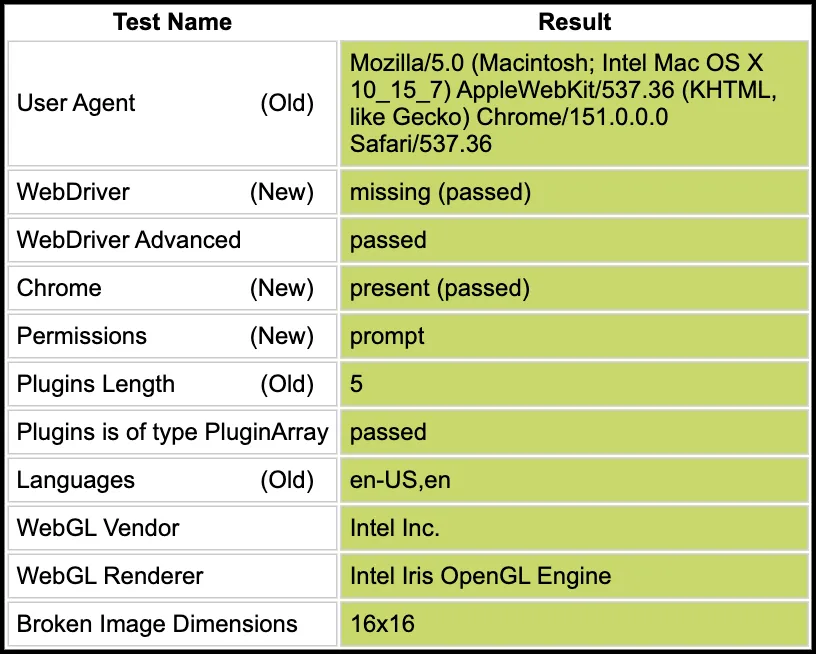
The screenshot shows the first Sannysoft table after JavaScript ran. The green cells describe the browser runtime, not the TLS impersonation library.
That experiment belongs at the edge of this topic, not at its center. Browser impersonation fixes the network identity of an HTTP client. Puppeteer Stealth modifies the observable runtime of a real browser.
Why a WAF may still say no
A matching TLS profile removes one easy reason to block a request. It does not grant immunity from bot detection. WAF and bot-management systems can combine the fingerprint with IP reputation, request rate, cookies, JavaScript challenges, header consistency, navigation order, and behavior across a session.
There are mundane mismatches too. Claiming Chrome 146 in the User-Agent while using an older Chrome TLS profile is suspicious. Randomly generating a new JA3 for every request is worse: real browser versions use recognizable families of fingerprints, not arbitrary valid combinations. A stable, coherent preset is usually more believable than creative randomness.
Cloudflare makes the limitation explicit in its writing about JA4 Signals: fingerprints are spoofable, so it combines them with statistics across requests. That is a good mental model for both sides. A fingerprint is evidence about the client implementation, not proof that a human is behind it.
My scraper ladder now looks like this:
- Try the native HTTP client.
- If the response suggests a protocol-level block, try a current browser profile with
curl-cffi,impers, orimpit. - Verify the profile against a fingerprint endpoint and keep the
User-Agent, TLS, and HTTP versions coherent. - Launch a browser only when the page or its protection genuinely requires JavaScript.
That order keeps simple SSR scraping simple. Browser impersonation is useful precisely because it fills the gap between changing a header and paying the full cost of running Chrome. Sometimes one option such as impersonate="chrome142" is all that gap needs.